Showing posts with label nursing homes. Show all posts

Wednesday, 4 December 2013

New Look Homepage

New Region List Accordion

Our homepage has recently had a new addition of a town list accordion allowing users to get direct access to care, nursing homes and care and nursing agency information, by doing this we have effectively pulled our main content up a level.

We hope this will allow our visitors to get to the content on our website quicker, allowing a more seamless visit and also removing a step that they would have to take to drill down to the town page.

For the accordion we used jQuery UI to provide the functionality this made sense due to the fact our rotation panels use this library and it also provides cross browser support. Our town lists are grouped by region rather than county.

As always we will be reviewing our new addition soon to see if we can improve upon the current offering. We hope you enjoy our new addition.


A screen shot of the new homepage with town accordion
New Look Homepage

Thursday, 27 June 2013

PHPUnit and Test Driven Development

More PHP Testing

We though we would write another article this time discussing testing PHP scripts using PHPUnit in an attempt to produce quality test units from our test cases.

During development we write PHPUnit test cases for each class we implement this allows us to build a collection of tests which we can run if we make any changes to our code base.

This allows us to verify that any changes we have made to a part of the system does not affect it as a whole.


And image with multiple text saying words such as web development and software testing
Software Testing


Installing PHPUnit

It is simple to install PHPUnit and there are a couple of ways you can go about it we use the pear packages provided for our installation. Run the following commands as root to start the installation process.
root@chic:~# pear channel-discover pear.phpunit.de &&\
pear install phpunit/PHPUnit


This will install PHPUnit on you system by adding the correct channel and running pear install. Pear is a great tool for packaging up PHP scripts but its beyond the scope of this article.

We also need to consider any dependencies which we need to install for some added functionality such as code coverage reports.
root@chic:~# pear config-set auto_discover 1 &&\
pear install phpunit/DbUnit &&\
pear install phpunit/PHP_Invoker &&\
pear install phpunit/PHPUnit_Selenium

Next we need to install xDebug which is a very useful and feature rich program which can be used for debugging purposes or profiling a script and much more.
root@chic:~# pecl install xdebug


Once this has installed we need to make the module load by adding a file to the conf.d directory under the PHP configuration directory.
/etc/php5/conf.d/


And add the following line to the new extension file like below by using a conf.d file allows changes to the main configuration to not affect xDebug,
zend_extension="/usr/local/php/modules/xdebug.so"


Now we are ready to start writing our test cases to build a test suit for any software we have developed.

The PHPUnit logo which has their name and a sort of square thing.
PHPUnit

Writing Test Cases

When we write classes or add some additional functionality to existing code we make sure that we write a comprehensive test case which tries to test all available code paths.

During development of our news system we have been writing test cases after we complete  each class that implements our functionality.

We follow a kind of test driven agile development but we like to implement our test cases after we have written the class to be tested not the other way around. This is a slight variation on test driven development and one that suites us.

Our test case uses the usual naming convention for class names such as NewsFunctionTests would be the test case for the NewsFunction class this is used for all classes.

Test case files are located under the tests directory which is a sub directory of the location of the class file which is being tested.

When writing a test case our test class extends the PHPUnit_Framework_TestCase as you may have noticed phpunit makes good use of class name spaces so we should have no class name collisions.

Naming of our test methods follow the standard convention (although this can be configured via comment tags) of prefixing all tests with the string test so if it was to test a method called newsMethod() it would be called testNewsMethod().

PHPUnit will run any methods with a test prefix as a test and the results of those tests will be displayed to the user via the command line.


class NewsTest extends PHPUnit_Framework_TestCase {
  public function testNewsMethod () {
    $this->assertTrue(true);
  }
}

The documentation for PHPUnit has a whole section for explaining available assertions which are the basis of your tests this allows a developer to test a response is correct and as expected. Please see here for documentation on assertions.

We have found the PHPUnit documentation a good reference point for when we are writing tests and it is a very useful and comprehensive website.

Test Case Class

Using PHPUnit

For running tests we use the phpunit command line program we have organised our test cases using a directory structure we also write a config file for each test suite the config file is named phpunit.xml and when you run phpunit via the command line it will check the working directory for this file.

We create a config file for each suite of tests so our first task before running our tests was to edit the xml configuration file.

vi /web/root/tests/phpunit.xml

We add our config

<?xml version="1.0" encoding="utf-8" ?>
<phpunit>
  <testsuites>

    <testsuite name="example_tests">
      <file>TestCaseOne.php</file>
      <file>TestCaseTwo.php</file>
    </testsuite>
  </testsuites>
</phpunit>

After this we run our test suite using the command line application we have added some switches to control how the program is run. We generate a code coverage report when running our test suites as well as some agile documentation.


root@chic:~# phpunit --coverage-html /report/output/dir/ \
--testdox-html /report/output/dir/ \
--bootstrap /path/to/bootstrap.php


You may notice the bootstrap flag which allows us to execute the contents of the bootstrap file before testing starts. We use this to load our database abstraction layer and set some configuration data.

Once the program finishes running the tests will have been executed and the results of those tests will be displayed to the command line. It shows how many tests have been run and the number of assertions.

Any failures will be displayed to the command line along with some useful debug information to tell you what has gone wrong and what was expected and what was encountered.

PHPUnit Command Line


Code Coverage Reports

We generate HTML code coverage reports while running our unit tests so we can see which lines of code our tests cover and which lines it does not.

This allows you to know you are testing every last line of your classes we upload our code coverage reports using scp to docs.chic.uk.net which is our digest protected documentation site.

By studying the code coverage reports we can check any missing tests and make sure we are testing our whole code base and where to focus our testing efforts.
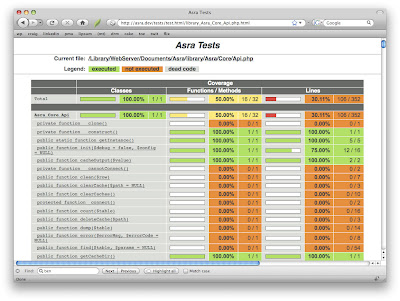

A screen shot of a code coverage report generated using PHPUnit and xDebug.
Code Coverage

Conclusion

Writing test suites to provide regression testing allows a developer to have confidence that their changes do not have wider implications on the system as a whole. We have found a combination of PHPUnit and xDebug provides us with a powerful testing platform.

Again this article show how we have taken advantage of an open source stack to provide a platform from which we can test our software.

In the coming weeks we will be writing an article regarding using xDebug for profiling scripts and using Kcachegrind to interpret the results from these tests.

Profiling allows a developer to focus his attentions on certain parts of code which may allow better optimisation in turn improving performance.

Finally a little note about our new feature to provide local amenity information we now have over 38000 local businesses in our database and listed on our listings pages and it is still growing.

This is a great resource for our visitors and we are happy with its progress so far please take a moment to visit one of our enhanced listings on The Care Homes Directory.


Appendix

PHPUnit logo: http://clivemind.com/wp-content/uploads/2012/07/logo.png
xDebug screen shot: http://webmozarts.com/wp-content/uploads/2009/04/xdebug_trace.png

Test class image: http://www.php-maven.org/branches/2.0-SNAPSHOT/images/tut/eclipse/phpunit_testcase.jpg

Saturday, 11 May 2013

Development Platforms and Practices

3C Web Development

In this article we will be covering the development environment and platforms that Chic Computer Consultants use while developing The Care Homes Directory website. We will cover what tools we use and the reasoning behind our choices.


Platforms

When we begun developing The Care Homes Directory we decided upon using the LAMP stack as our server platform. Our web server is a quad core, 4GB RAM, SSD machine running Debian 7.0 (Wheezy x86_64) and Apache 2MySQL 5 and PHP 5 sitting on top.

This platform has been very stable for us and we currently have a good amount of unused resources. While monitoring a server you can use the utility top to get the load average for the machine giving you an idea of how busy the machine is (or cat /proc/loadavg).


An image of a GNU laying down listening to music on some headphones
GNU/Linux


We have heavily customised our server changing the default scheduler to use a deadline rather than cfq. We also configured our TCP stack and installed PHP accelerators. We decided to use XCache for PHP optcode caching.


As well as these changes we modified the MySQL, PHP and Apache configuration to provide a faster install. On top of all this we did the usual hardening and configuration of a GNU/Linux system you would expect.


Bugzilla Bug Tracking

Even the best software has defects so obviously when developing you need to have a system for tracking bugs we use Mozilla's Bugzilla for our bug tracking.

We can raise any defects and/or enhancements to our code base directly from a web browser which is great for our testing team.


Screen shot of the Bugzilla home page.
Mozilla's Bugzilla
Before we release any software it must go through regression testing using unit tests and also any other use cases which need to be tested for before being sent for Q&A and general release.

We try to follow a rolling release schedule and use agile development to produce incremental updates to our code hence why rolling releases suit us.


Subversion Version Control

For source code revision control we decided to use Subversion rather than CVS or git which were the other two candidates we chose (we were already using Subversion when git was released). Subversion fits all our use cases and we have found it easy to use.

We have a main repository which allows all developers to access our source code and work independently of each other and when any changes have passed Q&A then it is merged into the trunk and tagged as a stable release.

To help add security (adding layers is good) when providing remote access we run everything over SSH tunnels including sftp so for accessing our repositories we require svn+ssh be used.

Subversion apache website screen shot.
Subversion


We did not go with CVS due to problems with it handling binary files and some people would consider it a bit "over the hill" and should be superseded by Subversion. Although we have do have previous work experience with CVS which went in its favour.


Recently we reviewed our choices and had a look at what git has to offer but we decided to stick with subversion as it has worked perfectly for us so "if it aint broke dont fix it", although git's distributed nature is appealing to us for the obvious replication advantages.


Developer Workstations

Our developer workstations run Mint GNU/Linux which is a derivative of Ubuntu which is another OS we allow on our workstations. We do use other operating systems inside the company but we are mainly a GNU/Linux house. The other OS we use are Windows, Android and iOS.

We do not use any IDE for our web development as we find gedit and Filezilla a good combination for any PHP, Python or working on writing markup. We do use Eclipse when developing in Java but that is beyond the scope of this article.


Mint & Cinnamon


In regards to our testing environment this will be covered in another article which will follow the release of this document. Selenium is a great tool for browser automation and we have test units which make use of it. We also make use of other tools but again this is for a future article.


Conclusion

I hope you have enjoyed this article and it has given you an insight of our development environment and how we like to approach things.

We will be writing another blog post about how we tested porting our site to HTML 5 and CSS3, the cross browser support issues we encountered and a little bit about our methods for testing our software.

Please take a moment to visit our Facebook page.

Thursday, 9 May 2013

Microdata and Breadcrumbs

New Vocabulary

When we moved our website over to HTML 5 it allowed us to start using microdata to markup our information and try to aid search engines and screen readers make sense of the data on our site.

First we chose a vocabulary to use, the vocabulary defines the way we describe our data and what it all means, in the end we decided on using schema.org.


Marking up

Once we had decided what vocabulary to use we then added the itemscope webpage to our template body tag to allow us to define anything inside the <body></body> tags as a property of WebPage. The schema for WebPage is a child of CreativeWork which is in turn a child of Thing.

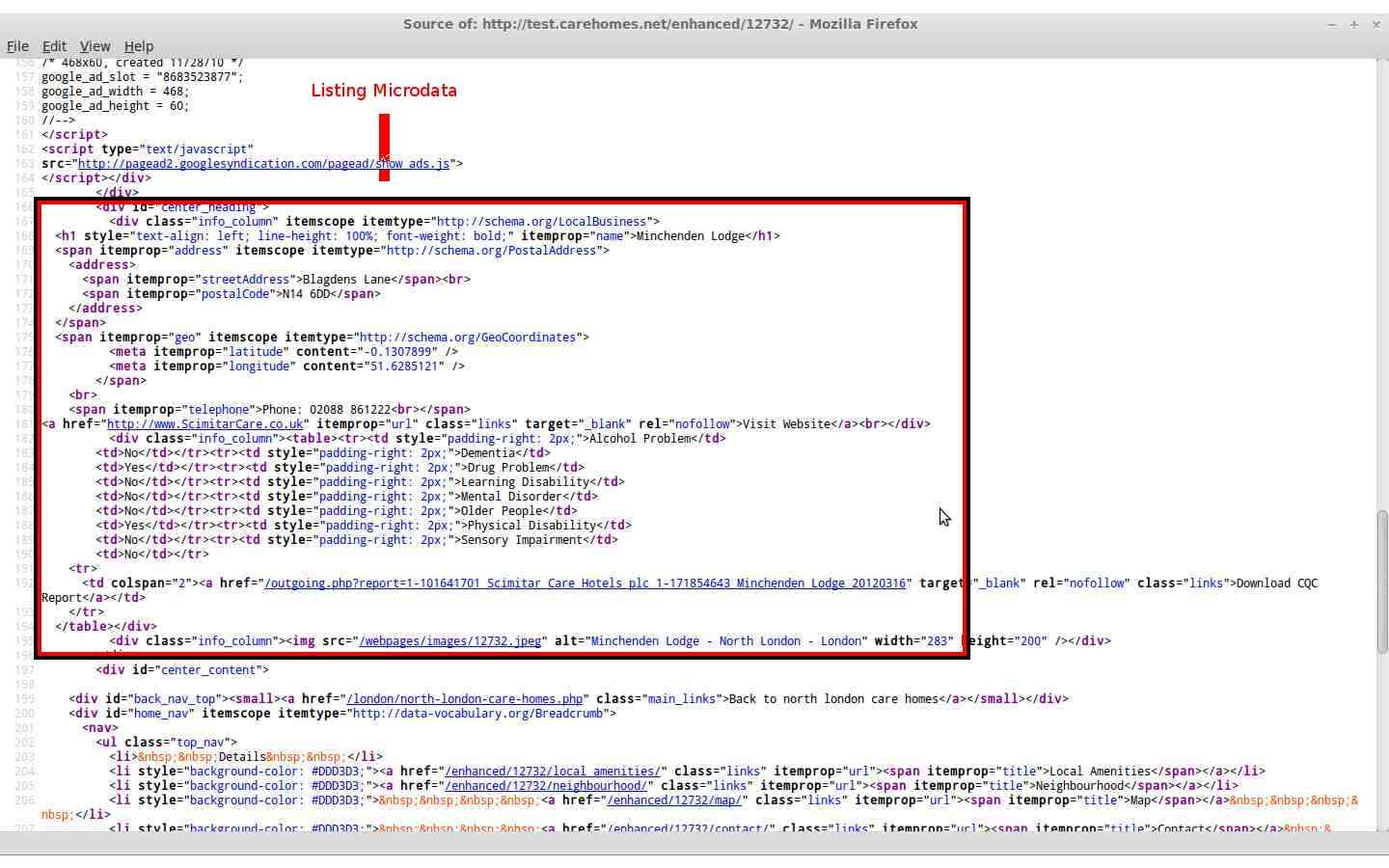
Then we added some microdata to our town page which is a listing of care and nursing homes in the selected town. We set the listings scope to LocalBusiness which describes "A particular physical business or branch of an organization"[1] and is ideal for our use. We could extend this but we will discuss this later.

Screen shot of the sites town listing page markup. A red box highlights the microdata
Town Listing Markup

LocalBusiness has certain properties which are used to describe attributes think of it like OOP (Object Orientated Programming) where you have objects and those objects have attributes such as a Person object that could have attributes eye colour, hair colour etc..

Our town page has information about each listing and the associated itemprop such as the homes name, address, telephone, fax, geographical coordinates (meta data), url and description.

By using the itemprop attribute we can help describe exactly what each bit of text means in our webpages.


Leaving a Trail

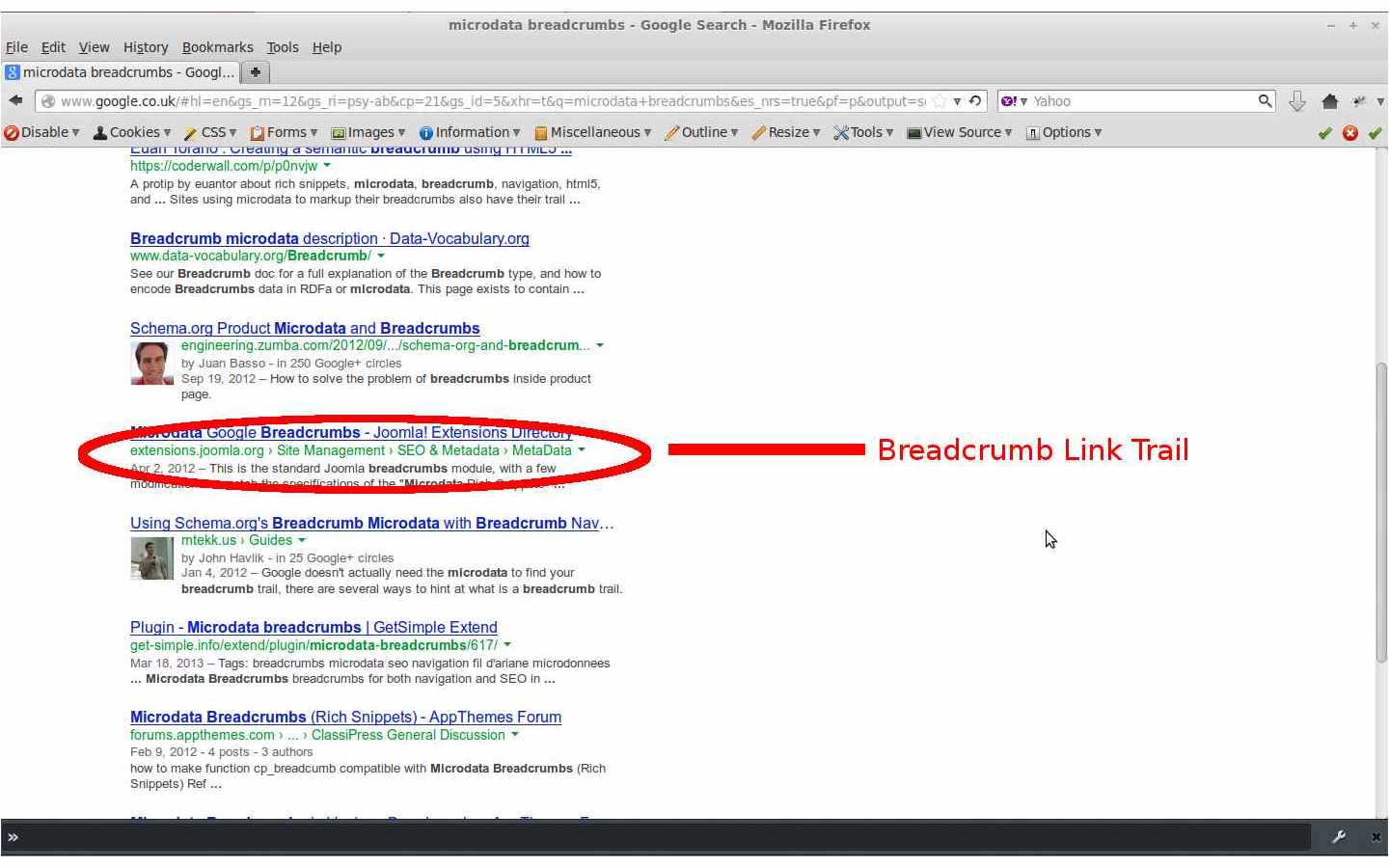
Next we added some breadcrumbs to the site templates main navigation sections which are inside HTML 5 <nav> tags. Breadcrumbs can be used to help define the hierarchy of your site and can also be used by search engines. The screen shot below show a Google SERP which is displaying some breadcrumbs for the search keywords "microdata breadcrumb"[2].
An image of a SERP page with breadcrumbs under the anchor text which is highlighted by a red elypsis
Breadcrumb Link Trail


Our site makes use of the title and url properties and we hope implementing breadcrumbs will aid any robots crawling our website and also allow our users to access the pages hierarchical links. Here is some further reading on breadcrumbs.

Breadcrumbs Inside Nav Tags


Extending Vocabulary

We are considering extending the vocabulary for LocalBuisness to make our data even more granular the parent child relationship between schemas could be used to create a CareHome schema which could extend the LocalBuisness schema.

Currently we feel it would be beyond our websites scope to start providing custom schemas although it has been added to our possible feature list and will be considered at a later date.

A screen shot of HTML markup with a red square highlighting the listings microdata
Listing Microdata


Conclusion

We hope this article has given you a better understanding of microdata and how The Care Homes Directory has integrated this technology into our website templates.

As always we will be reviewing our microdata and also cleaning up the current tags we have, as there is always room for improvement. We are also considering adding more item properties to our site.

Please check back soon because we will be writing some more articles and hope you find them useful. We will be producing a guide to using The Care Homes Directory Enhanced Listings on our site soon and an article on our development platform and development practises.

You can also contact me using my Google Plus account name, Chris Elsen.


Appendix

[1] http://schema.org/LocalBusiness
[2] SERP results (originally accessed on 2013-05-09)