Showing posts with label web development. Show all posts

Wednesday, 29 May 2013

Source Code Documentation

Generating Documentation Using PHPDocumentor 2

I though I would write a little bit about how we document our source code at Chic Computer Consultants and give an example of how we setup our documentation website.

As we all know it is important to have up to date documents and we try to keep our as up to date as possible.


Inline Documentation

We use inline comments inside our source files to document our source code we use Phpdocumentor to generate a documentation website from these inline comments.

It is very simple and makes life a lot easier by automating the updating of our documents allowing us to just run it by cron and that is all we have to worry about.

You can add inline docs simply by using the following comments in you source files,

/**
* Comment Header
* <p>Some stuff here to describe our content</p>
@package default
* @category core
*/

The above comment contains a paragraph and also defines the package directive this directive is used with @category to compartmentalise your source tree.


/** Another PHPDocumentor comment */

Above is a simple comment with no directives for a complete list of directives please see this page and for more information on using Phpdocumentor please see here.


Generating Documents

To generate the documentation we use PHPDocumentor 2 to transverse our source tree and parse the inline comments into a nice easy to use format which is web accessible for our web site we use digest authentication to restrict access to our documents.

Our first task was to install PHPDocumentor which is really simple to do as they use pear to package up their software.


root@chic:~# pear channel-discover pear.phpdoc.org

root@chic:~# pear install phpdoc/phpDocumentor-alpha

It should now be installed on your system under /usr/bin which should be in your $PATH allowing you to access the program by typing phpdoc at a shell prompt.

Once we had installed the software needed to generate our documentation we needed to modify the configuration file so we can change the title and heading to something more custom.
A screen shot of the phpdocumentor config file in a vi editor
Vi Config
The file we need is the main configuration file for Phpdocumentor you could also create a custom one but the default suited our needs. There is more information in the docs here. So our next step is to use the following command,


root@chic:~# updatedb && locate phpdoc.tpl.xml

This command will update the slocate database then us slocate to try and find the config file but only if the previous command was successful. The file is named phpdoc.tpl.xml and on our system (Debian) it was located here,


/usr/share/php/phpDocumentor/data/phpdoc.tpl.xml

If you open up this file you can add a custom title which in our case we named it Chic Computer Consultants Documentation. You can use any editor we like vi or nano.

vi /usr/share/php/phpDocumentor/data/phpdoc.tpl.xml

Once in vi switch from command mode by pressing i and add the following line to the bottom of the file inside the <phpdocumentor> tags (file is an XML file) then exit vi saving the file (shift zz).

<title>Chic Computer Consultants Documentation</title>

After this we needed to setup a virtual host on Apache, configure the DNS to point towards our documentation website (docs.chic.uk.net) and install dependencies (this may vary on your system).


apt-get install php5-xsl graphviz graphviz-dev

Then finally we can generated the documentation we decided to use the default template which is responsive*.

phpdoc -d /path/to/web/root/source_tree/ -t /path/to/web/root/docs/

Once the program finishes running our documentation website has been created so its time to check it all worked and looks good.

We use cron to update our documentation every night but you need to add the -q switch to the end of the above command this will suppress any output.

Screen shot of an example of a phpdocumentor generated website using the responsive template
Documentation Example

More Documents

We also have other types of documents to help us develop our software, we use Dia for creating diagrams of our database schema. We use a relational database (RDBMS) so we map our associations using it. You can also create other kinds of diagrams using Dia but that is beyond this article.

For our UML documents we like to use umbrello which we think is great for modelling our class hierarchy and creating class maps helping us keep track of whats doing what.


Screen shot of umbrello a UML diagram editor
UML Diagram
For any word processor documents or spreadsheets we use Libra Office which is a fork of OO.org. We use a word processor sometimes when we need to document use cases and such things.


Conclusion

We hope this article gives you an idea of how we handle documenting our development and some of the tools we use to accomplish this.

As you can see from our list of documentation software all our needs are provided by free and/or open source software stacks. Basing our development entirely on an open stack suits us as a company.

On a side note progress on the care related news system is coming along well and we are currently integrating it into our social media accounts so we will be documenting this system in a future article.

We have implemented so far, the administration panel, news editor panel and the news article front end so it should not be long before we are providing news.

We would also like to get some news syndication if we can find any one interested in providing and/or using our service.


Appendix

* At the time of writing 2013-05-29

Saturday, 11 May 2013

Development Platforms and Practices

3C Web Development

In this article we will be covering the development environment and platforms that Chic Computer Consultants use while developing The Care Homes Directory website. We will cover what tools we use and the reasoning behind our choices.


Platforms

When we begun developing The Care Homes Directory we decided upon using the LAMP stack as our server platform. Our web server is a quad core, 4GB RAM, SSD machine running Debian 7.0 (Wheezy x86_64) and Apache 2MySQL 5 and PHP 5 sitting on top.

This platform has been very stable for us and we currently have a good amount of unused resources. While monitoring a server you can use the utility top to get the load average for the machine giving you an idea of how busy the machine is (or cat /proc/loadavg).


An image of a GNU laying down listening to music on some headphones
GNU/Linux


We have heavily customised our server changing the default scheduler to use a deadline rather than cfq. We also configured our TCP stack and installed PHP accelerators. We decided to use XCache for PHP optcode caching.


As well as these changes we modified the MySQL, PHP and Apache configuration to provide a faster install. On top of all this we did the usual hardening and configuration of a GNU/Linux system you would expect.


Bugzilla Bug Tracking

Even the best software has defects so obviously when developing you need to have a system for tracking bugs we use Mozilla's Bugzilla for our bug tracking.

We can raise any defects and/or enhancements to our code base directly from a web browser which is great for our testing team.


Screen shot of the Bugzilla home page.
Mozilla's Bugzilla
Before we release any software it must go through regression testing using unit tests and also any other use cases which need to be tested for before being sent for Q&A and general release.

We try to follow a rolling release schedule and use agile development to produce incremental updates to our code hence why rolling releases suit us.


Subversion Version Control

For source code revision control we decided to use Subversion rather than CVS or git which were the other two candidates we chose (we were already using Subversion when git was released). Subversion fits all our use cases and we have found it easy to use.

We have a main repository which allows all developers to access our source code and work independently of each other and when any changes have passed Q&A then it is merged into the trunk and tagged as a stable release.

To help add security (adding layers is good) when providing remote access we run everything over SSH tunnels including sftp so for accessing our repositories we require svn+ssh be used.

Subversion apache website screen shot.
Subversion


We did not go with CVS due to problems with it handling binary files and some people would consider it a bit "over the hill" and should be superseded by Subversion. Although we have do have previous work experience with CVS which went in its favour.


Recently we reviewed our choices and had a look at what git has to offer but we decided to stick with subversion as it has worked perfectly for us so "if it aint broke dont fix it", although git's distributed nature is appealing to us for the obvious replication advantages.


Developer Workstations

Our developer workstations run Mint GNU/Linux which is a derivative of Ubuntu which is another OS we allow on our workstations. We do use other operating systems inside the company but we are mainly a GNU/Linux house. The other OS we use are Windows, Android and iOS.

We do not use any IDE for our web development as we find gedit and Filezilla a good combination for any PHP, Python or working on writing markup. We do use Eclipse when developing in Java but that is beyond the scope of this article.


Mint & Cinnamon


In regards to our testing environment this will be covered in another article which will follow the release of this document. Selenium is a great tool for browser automation and we have test units which make use of it. We also make use of other tools but again this is for a future article.


Conclusion

I hope you have enjoyed this article and it has given you an insight of our development environment and how we like to approach things.

We will be writing another blog post about how we tested porting our site to HTML 5 and CSS3, the cross browser support issues we encountered and a little bit about our methods for testing our software.

Please take a moment to visit our Facebook page.

Thursday, 9 May 2013

Microdata and Breadcrumbs

New Vocabulary

When we moved our website over to HTML 5 it allowed us to start using microdata to markup our information and try to aid search engines and screen readers make sense of the data on our site.

First we chose a vocabulary to use, the vocabulary defines the way we describe our data and what it all means, in the end we decided on using schema.org.


Marking up

Once we had decided what vocabulary to use we then added the itemscope webpage to our template body tag to allow us to define anything inside the <body></body> tags as a property of WebPage. The schema for WebPage is a child of CreativeWork which is in turn a child of Thing.

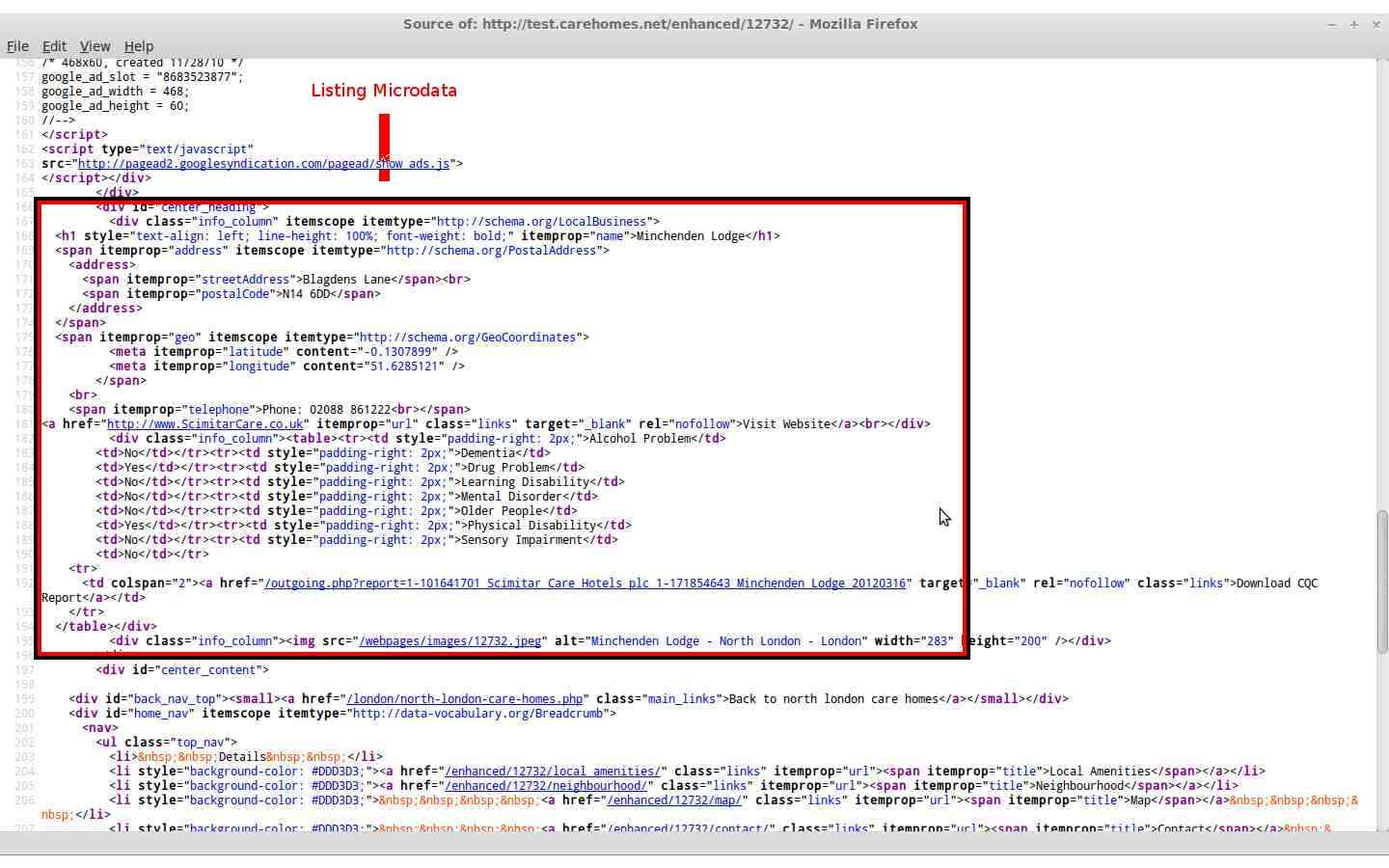
Then we added some microdata to our town page which is a listing of care and nursing homes in the selected town. We set the listings scope to LocalBusiness which describes "A particular physical business or branch of an organization"[1] and is ideal for our use. We could extend this but we will discuss this later.

Screen shot of the sites town listing page markup. A red box highlights the microdata
Town Listing Markup

LocalBusiness has certain properties which are used to describe attributes think of it like OOP (Object Orientated Programming) where you have objects and those objects have attributes such as a Person object that could have attributes eye colour, hair colour etc..

Our town page has information about each listing and the associated itemprop such as the homes name, address, telephone, fax, geographical coordinates (meta data), url and description.

By using the itemprop attribute we can help describe exactly what each bit of text means in our webpages.


Leaving a Trail

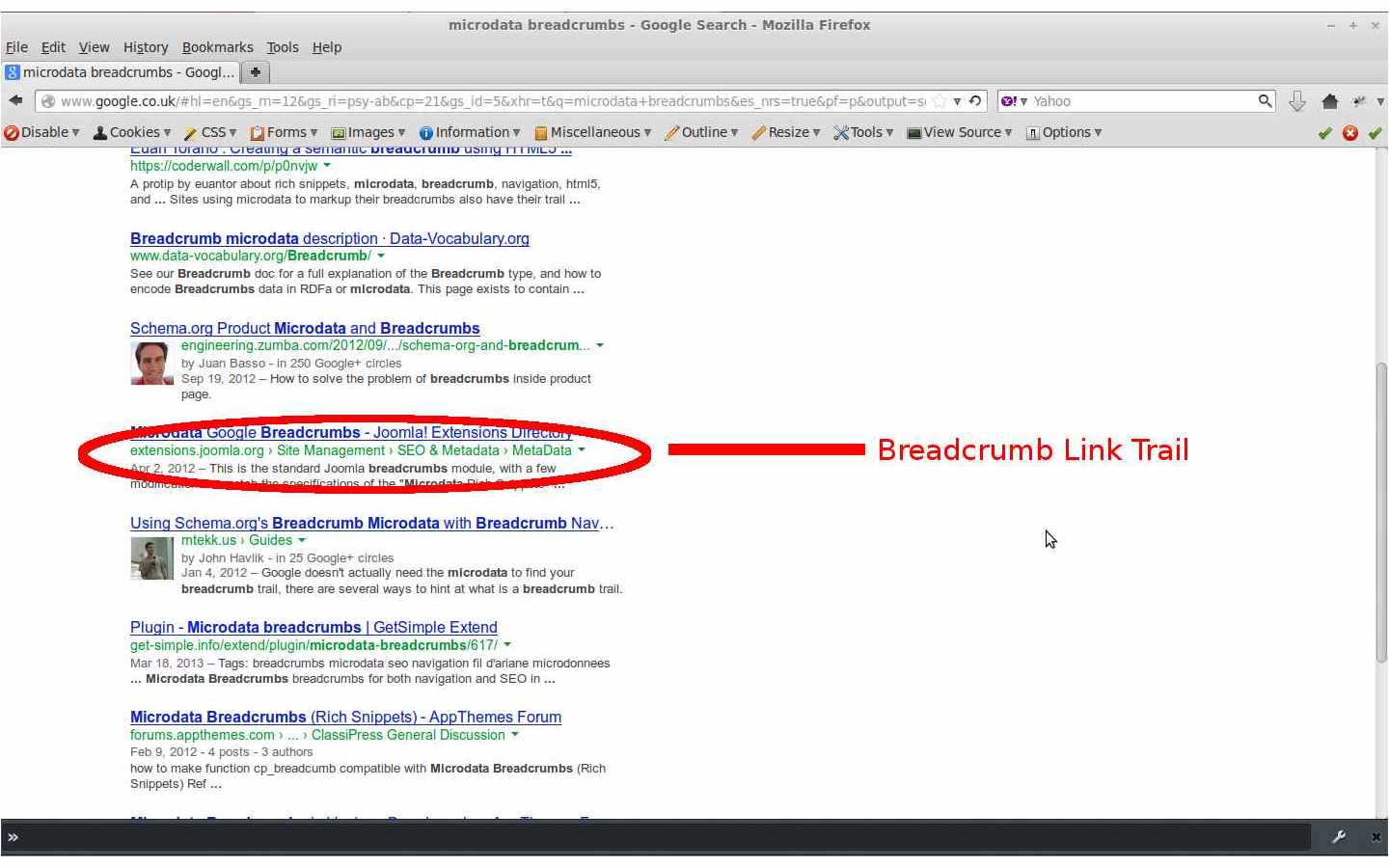
Next we added some breadcrumbs to the site templates main navigation sections which are inside HTML 5 <nav> tags. Breadcrumbs can be used to help define the hierarchy of your site and can also be used by search engines. The screen shot below show a Google SERP which is displaying some breadcrumbs for the search keywords "microdata breadcrumb"[2].
An image of a SERP page with breadcrumbs under the anchor text which is highlighted by a red elypsis
Breadcrumb Link Trail


Our site makes use of the title and url properties and we hope implementing breadcrumbs will aid any robots crawling our website and also allow our users to access the pages hierarchical links. Here is some further reading on breadcrumbs.

Breadcrumbs Inside Nav Tags


Extending Vocabulary

We are considering extending the vocabulary for LocalBuisness to make our data even more granular the parent child relationship between schemas could be used to create a CareHome schema which could extend the LocalBuisness schema.

Currently we feel it would be beyond our websites scope to start providing custom schemas although it has been added to our possible feature list and will be considered at a later date.

A screen shot of HTML markup with a red square highlighting the listings microdata
Listing Microdata


Conclusion

We hope this article has given you a better understanding of microdata and how The Care Homes Directory has integrated this technology into our website templates.

As always we will be reviewing our microdata and also cleaning up the current tags we have, as there is always room for improvement. We are also considering adding more item properties to our site.

Please check back soon because we will be writing some more articles and hope you find them useful. We will be producing a guide to using The Care Homes Directory Enhanced Listings on our site soon and an article on our development platform and development practises.

You can also contact me using my Google Plus account name, Chris Elsen.


Appendix

[1] http://schema.org/LocalBusiness
[2] SERP results (originally accessed on 2013-05-09)